
2605 Bamboo Radio Alarm Clock Wholesale: Retail Demo Plan
Prepare the 2605 for retail by verifying the FM demonstration, dual alarms, snooze, display language, product assets, packaging and pilot support.
Give the 2605 One Clear Retail Job

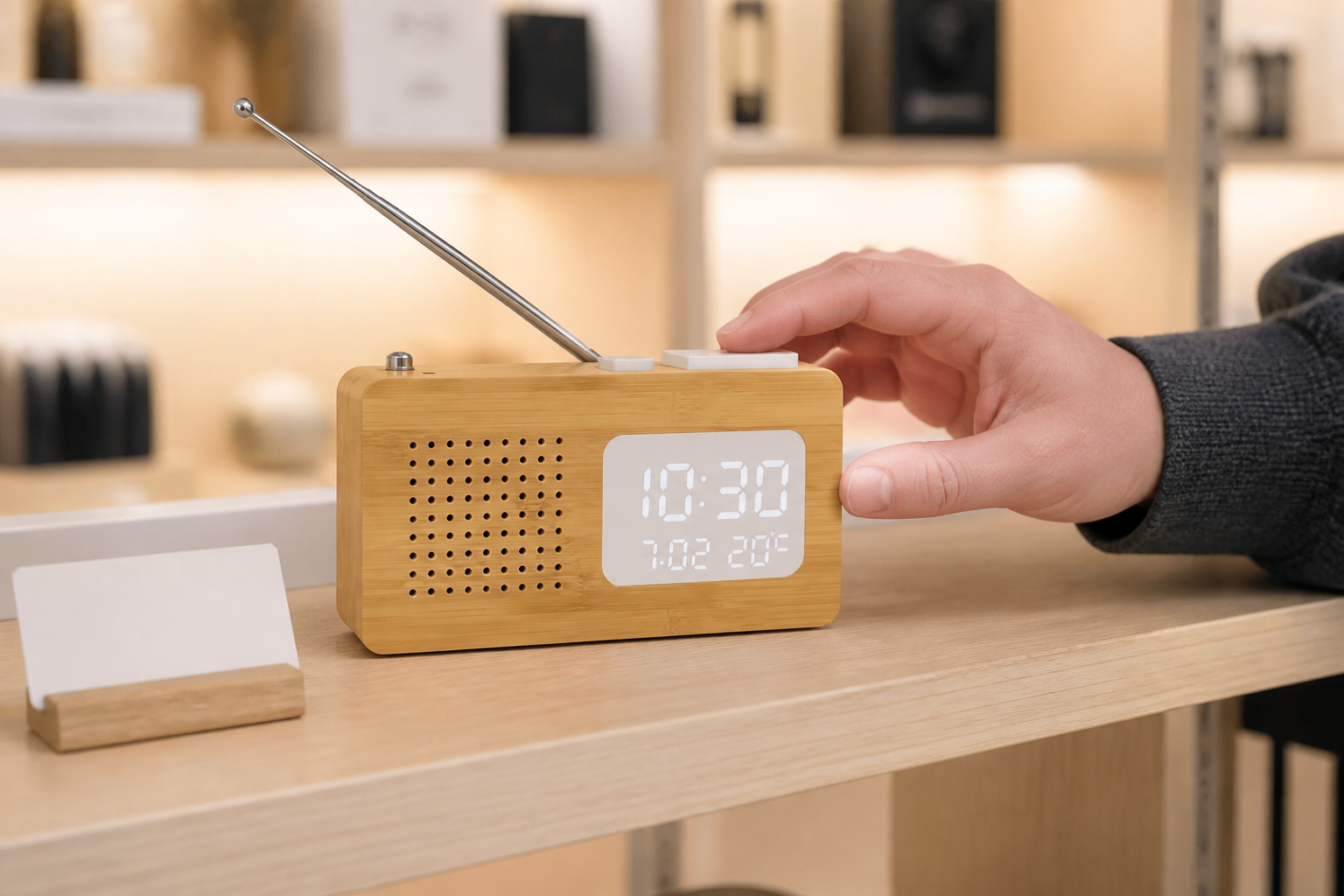
A 2605 bamboo radio alarm clock wholesale launch works best when the retailer defines the product job before ordering. The compact 132 × 40 × 78 mm unit combines natural bamboo and ABS, FM 87.5-108 MHz radio, a telescopic antenna, dual alarms, a 9-minute snooze and a white LED display for time, date and temperature.
Use the 2605 compact bamboo radio alarm clock as the listing and sample reference. Position it as a compact radio clock with verified controls and display functions, rather than adding broad audio, reception or environmental claims.
Demo FM Tuning in the Real Sales Environment
Radio reception varies with location, building materials, antenna position and local stations. Test the sample in the intended store or showroom, extend the antenna naturally and record which stations were used for the demonstration.
The radio alarm clock category includes different bodies and control layouts, so each model needs its own store card. Staff should know how to tune, adjust and stop the radio without promising identical reception in every customer location.
Test Dual Alarms and Snooze as a Customer
Set both alarms through a complete cycle and record the button sequence. Then activate the 9-minute snooze, cancel the alarm and return the display to its normal state as a first-time customer would.
A useful demo card explains the difference between alarm one and alarm two in plain language. If the proposed manual creates confusion at the shelf, revise it before the first order instead of passing the issue to customer support.
Show the Display Without Overpromising
The front window shows white LED time, date and temperature information. Photograph the supplied sample under normal retail light and check whether the main fields remain understandable from the intended shelf distance.
Temperature should be presented as displayed information unless an accuracy statement and test method have been verified. Packaging and listings should not turn the product into a calibrated room monitor or make claims that the wholesale sample cannot support.
Compare the 2605 With Nearby Radio Clock Formats

The 2602 bamboo radio alarm clock is larger and uses a different display arrangement, while the 2609B FM radio alarm clock has its own long, low profile. Compare real samples for shelf footprint, display emphasis and control access.
Do not list three radio clocks as interchangeable bamboo rectangles. A compact hero SKU, a larger display-led option and a different silhouette can serve distinct shoppers when the assortment story is clear.
Build the Listing and Store Demo From One Sample

Use the same approved 2605 for the product page, shelf image, short demo video and staff instructions. Show the speaker-hole grid, white display window, top controls and antenna accurately, and keep other radio-clock images out of the asset folder.
The broader radio alarm clock wholesale guide can support supplier questions, but the 2605 listing still needs model-specific facts. Every image and caption should be checked against the controlled sample before publishing.
Prepare Packaging and First-Line Support

Pack the radio clock with its approved manual and quoted accessories, protecting the bamboo edges, display, top controls and telescopic antenna. Confirm how the antenna is secured and how the contents are arranged so nothing presses against the front window.
Use the product image checklist before carton printing. The box image, model name, alarm instructions and included-parts list should all identify 2605 rather than a generic FM clock.
Use Pilot Feedback to Plan Reorders
Start with a controlled retail or e-commerce pilot and record what customers ask about tuning, alarms, snooze, display and included accessories. Separate product questions from unclear listing or instruction issues.
Use that evidence to refine staff training, product-page copy and reorder quantities. Do not treat a few reactions as a market statistic; keep the feedback tied to the tested stores, dates and sample revision.
Send a Retail-Ready Wholesale Inquiry
Include the 2605 model, destination market, quantity, sales channel, planned demonstration, packaging language, logo requirement, manual needs, delivery schedule and any model-comparison request.
Ask for a complete sample set that connects the radio and alarm workflow, display images, approved packaging and support material. This gives a distributor a more useful basis for launch than a price-only request for bamboo radio clocks.
Build the specification before comparing the final price.
Align the target channel, product functions, destination market, branding and packaging route before approving a sample or bulk quotation.